Rivia Core
AI-powered Data Intelligence Layer
Rivia Core unifies fragmented clinical trial data into a single, structured foundation. It ingests data from any vendor or file, harmonizes formats, and maps it into reusable, trial-specific models that reflect protocol logic, visits, and endpoints.
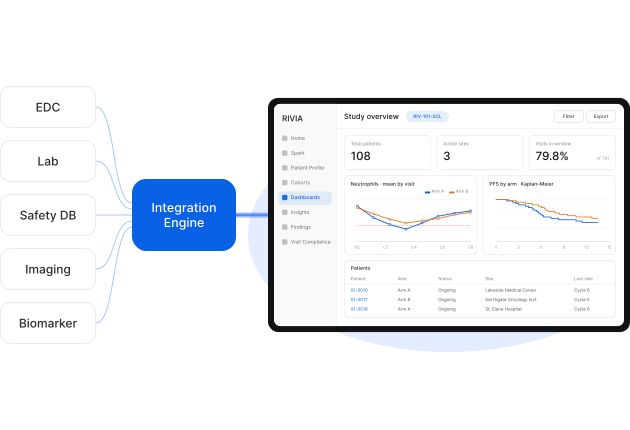
How Core works
From Integration to Execution
Rivia connects your existing trial systems, harmonizes the data and applies trial-specific clinical logic. Your team works from one live view, from individual patients to the wider program.
01
Ingestion
Your trial data, automatically connected
+
Existing connections to all incumbent providers, and any new vendor added in days. EDC, lab, safety, biomarker and more, from any vendor system or internal file share, all brought together in real-time.
+
Rivia connectors retrieve data from supported vendor portals when an API connection is unavailable.
+
Millions of data points synced automatically so study teams never miss critical information.
02
Harmonization & enrichment
Clinical logic, configured and enriched for your trial
+
Units and variable names are aligned, and related source files are harmonized into one consistent SDTM structure.
+
Built-in clinical calculations enrich your data with measures such as change from baseline, toxicity grades and treatment response.
+
Study and therapeutic-domain logic is adapted to your trial’s requirements, with custom configurations handled by Rivia.
03
Visualization & analysis
A live, connected foundation for your team
+
Move between program-level views, study populations and individual patients, all drawing on the same connected data.
+
Connected views are updated as new source data is synchronized, without rebuilding reports for each data refresh.
+
Built-in review and analysis tools let your team work directly with the data, with agentic assistance alongside.
See Rivia Core Pull a Trial Together
Capabilities
How Teams Work with Rivia Core
With trial data unified, harmonized and enriched, your team can explore patients, monitor the study and answer clinical questions.
Investigate
Review one patient’s full clinical journey on a single configurable timeline, with every data point traceable to its source.
Decide
Track study activity through dashboards that refresh as new data arrives, from enrollment to safety and efficacy.
Build
Build complex tables with our AI Assistant, from adverse event summaries to missing lab values and eligibility checks.
Segment
Define patient groups by property or reported event, and reuse them across every chart, table, and dashboard.
Track
See which visits were performed, missed, or are still pending an EDC record, updated as your site data comes in.
01
Investigate
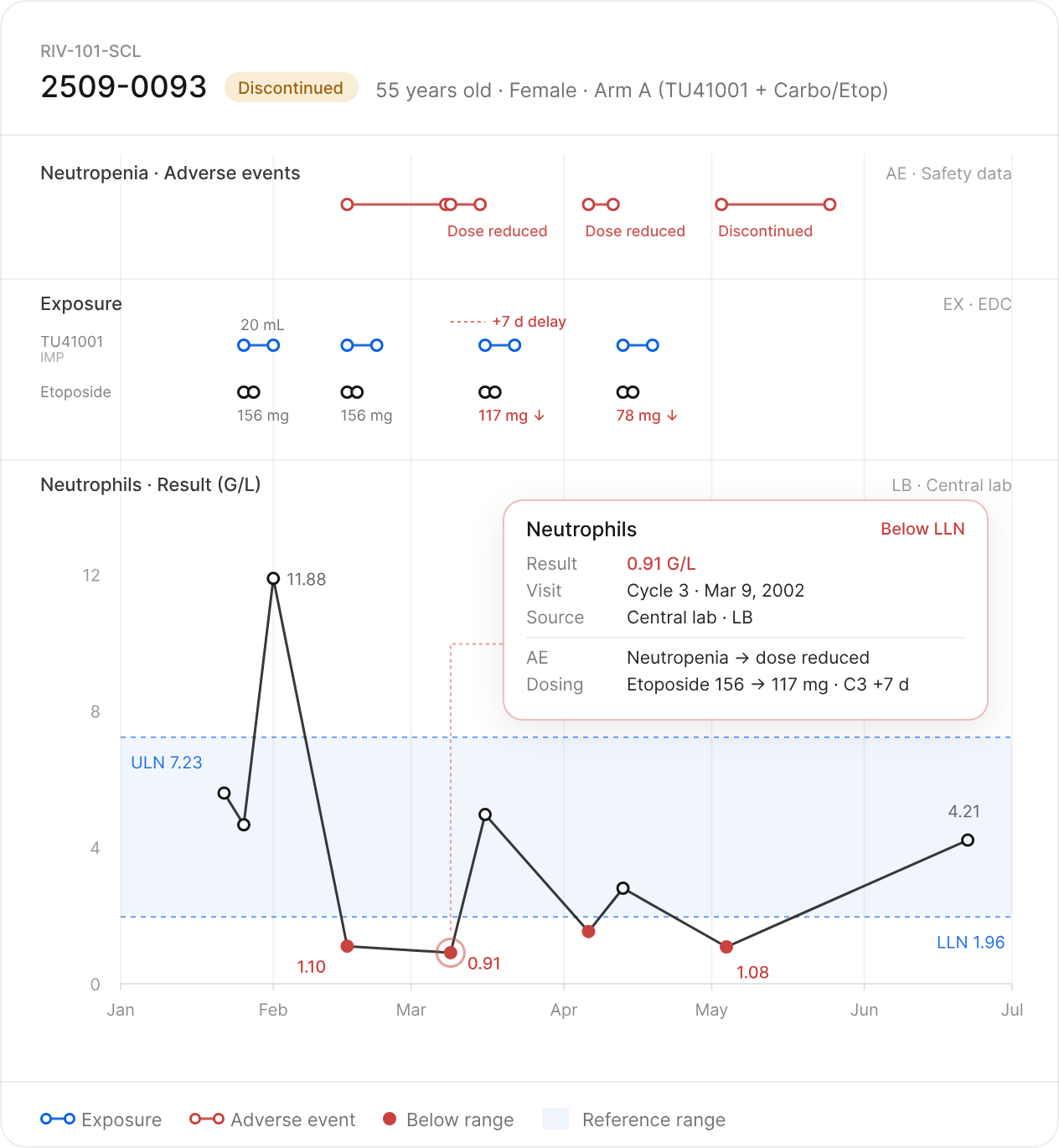
Patient Profile
Review one patient’s full clinical journey on a single configurable timeline, with every data point traceable to its source.
Review lab trends and clinical events side by side to understand their timing and relationships.
Configure the timeline around the domains and events relevant to your review.
Open any data point to see the underlying detail and trace it back to the source record.
02
Decide
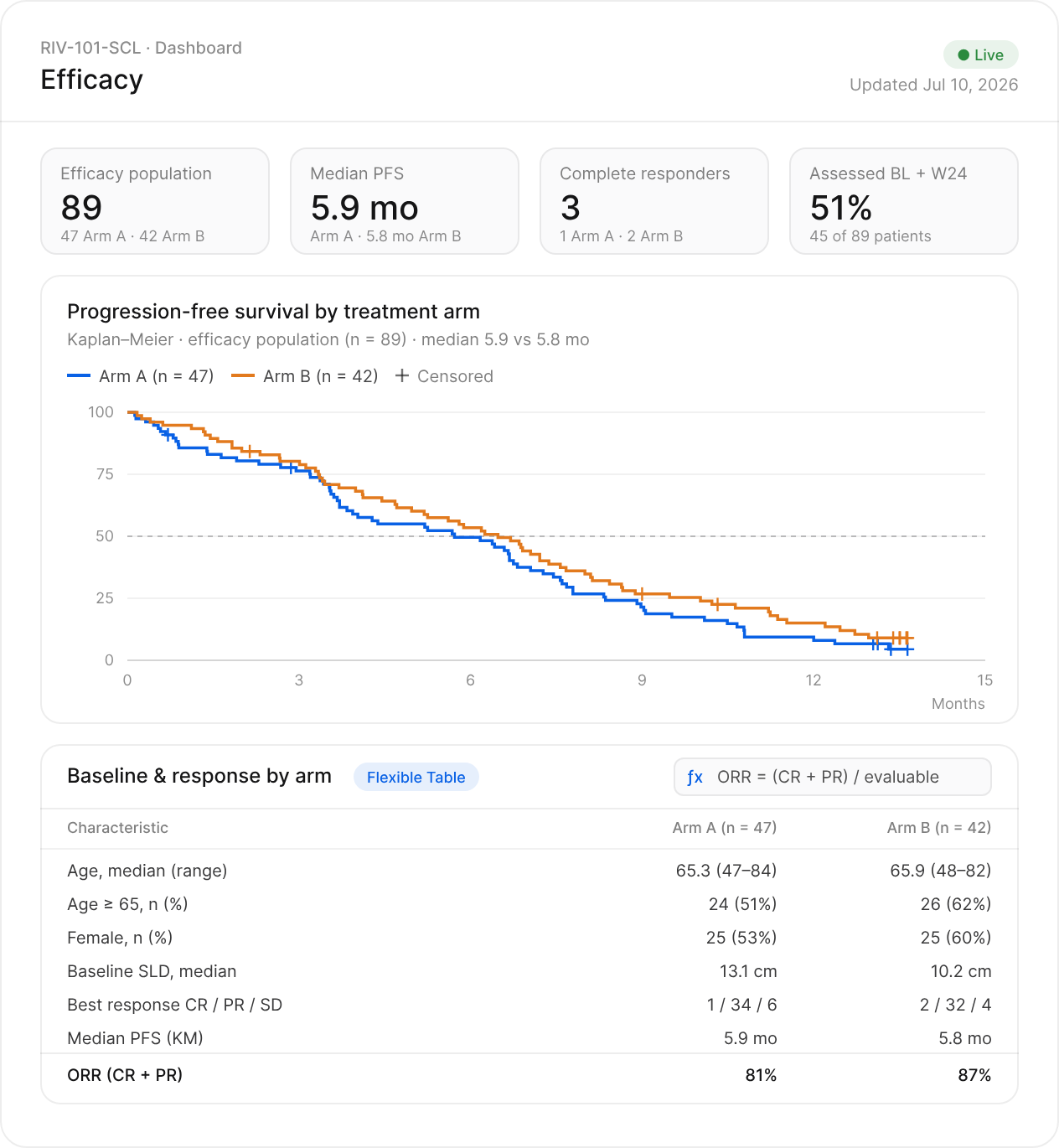
Live Dashboards
Track study activity through dashboards that refresh as new data arrives, from enrollment to safety and efficacy.
Build Kaplan–Meier curves and other clinical visualizations. Organize trial data in Flexible Tables with formulas, groupings and conditional highlighting.
Charts and tables refresh as new data arrives, without rebuilding the analysis for each update.
Share live dashboards or export to PDF and Excel without rebuilding the analysis.
03
Build
Table Assistant
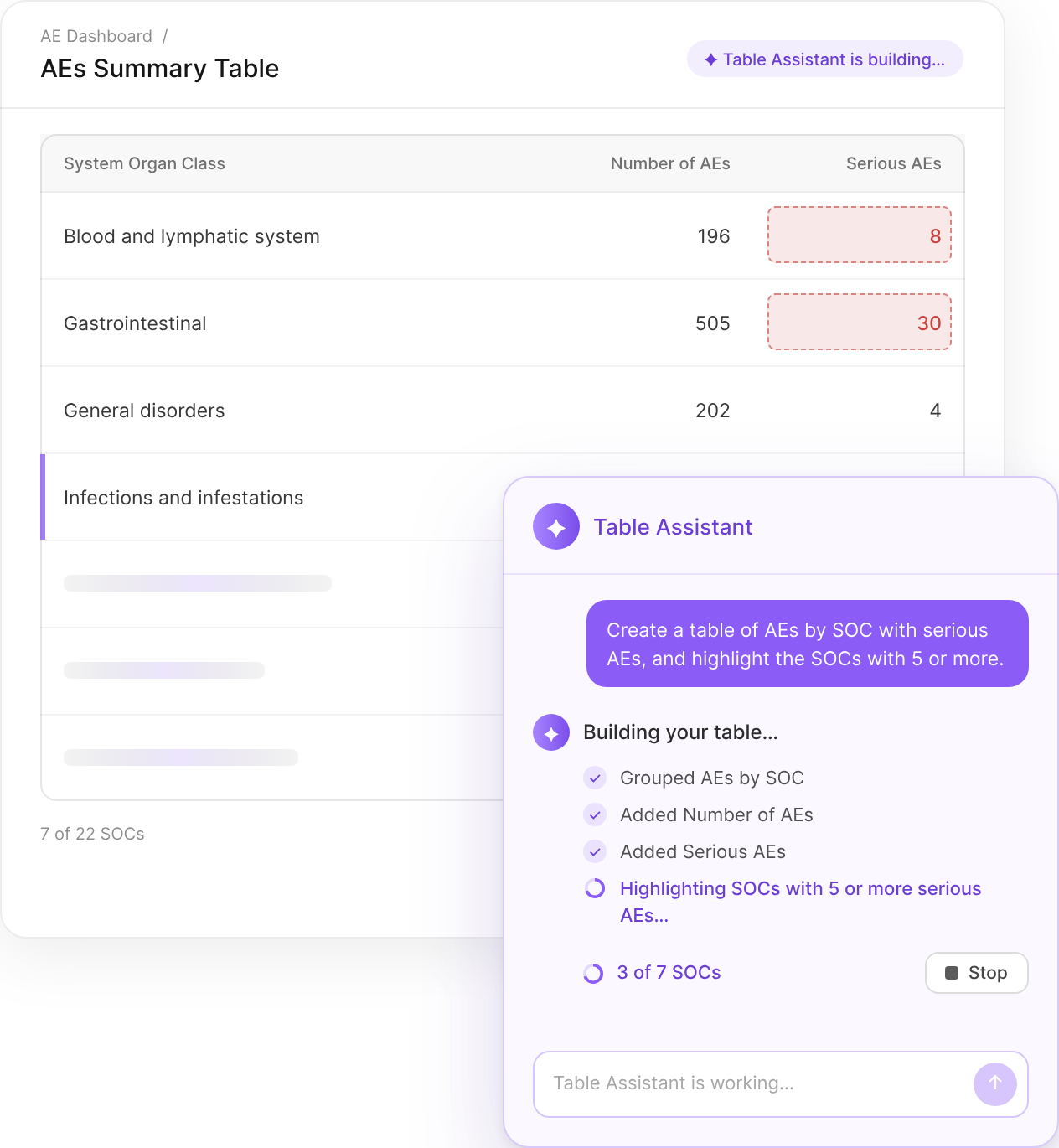
Build complex tables with our AI Assistant, from adverse event summaries to missing lab values and eligibility checks.
Describe the table you need, such as adverse events by SOC and severity, and get it built for you.
Preview proposed changes and accept or reject them from the table toolbar.
Changes apply to the table’s configuration, not the underlying clinical trial data.
04
Segment
Cohort Builder & Library
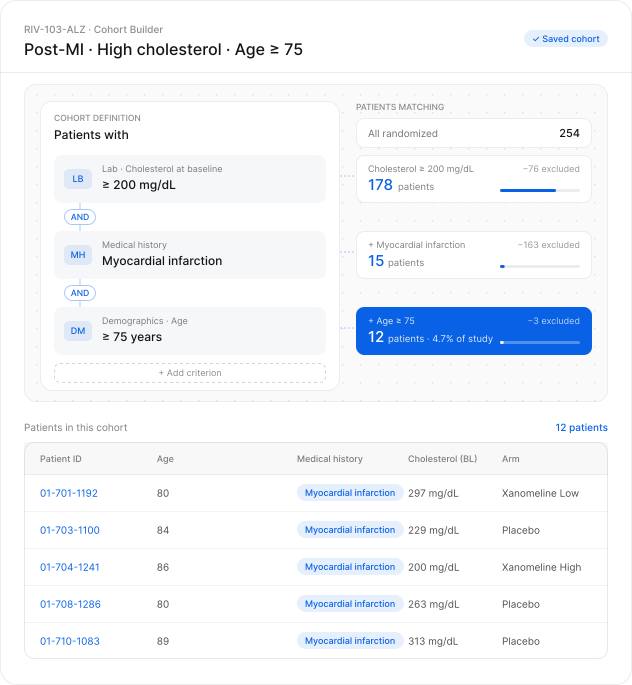
Define patient groups by property or reported event, and reuse them across every chart, table, and dashboard.
Combine patient characteristics and clinical events to select the population you want to review.
Apply the cohort to charts and tables to investigate patterns within the selected population.
Reuse the same cohort across dashboards and analyses throughout the program.
05
Track
Visit Compliance
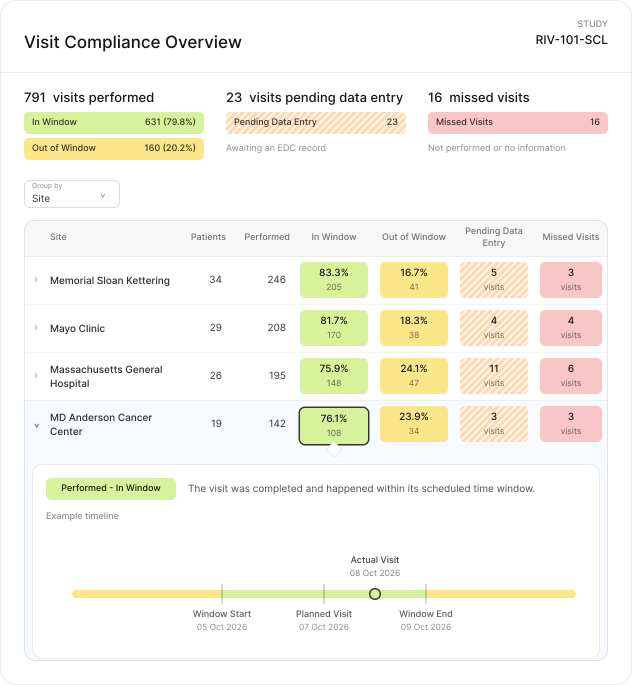
See which visits were performed, missed, or are still pending an EDC record, updated as your site data comes in.
Review visit completion, missed visits and pending data entry across the study, grouped by site.
Review each patient’s schedule to identify missed or out-of-window visits.
Identify visits awaiting an EDC record to focus follow-up with sites.
Compare
What Changes with Rivia Core
Teams spend too much time assembling data before they can answer a question. Core turns fragmented trial data into a workspace they can work from continuously.
Data infrastructure
Capabilities
Less time preparing the data.
More time understanding the trial.
Real Results from Clinical Teams


.png)






Evidence
Real Results from Clinical Teams
See how clinical teams use Rivia to reduce manual work, accelerate data review, and spend more time on clinical interpretation and decision-making.
Half a day
to minutes
Omeicos reduced a recurring monthly safety-reporting workflow from half a day to minutes using Rivia’s integrated safety workflows.
Explore more →3–6× faster review cycles
By bringing labs, timelines, adverse events, imaging, and other trial data into one clinically meaningful view, Rivia reduced review cycles by three to six times, turning weeks of preparation into hours.
Explore more →91% less time
per review
In a Phase 2 evaluation, average clinical data review task time decreased from 47 minutes manually to 2 minutes with Spark, a 91% reduction.
Explore more →Conviction & Trust
Built for Clinical Trials
Security, quality, privacy and traceability are built into how Rivia operates.
Certified & Compliant
✓
ISO 27001
✓
ISO 9001
✓
ICH GCP E6(R3)
✓
GDPR
✓
FDA 21 CFR Part 11
✓
EU Annex 11
Rivia is also audited annually by independent third parties.
Security by Design
✓
AES-256 encryption at rest
✓
TLS in transit
✓
Role-based access
✓
Multi-factor authentication
Security is embedded throughout the platform, not added around it.
Your Data, Your Control
✓
Customer ownership and control
✓
Role-based access controls for authorized users
✓
Full audit trail on every change
Your trial data stays yours, and every action stays traceable.
Built for regulated trials
Access our Trust Center


Explore
Explore Related Topics
See how Rivia Core connects to the rest of the platform and the teams who use it every day.
Data Findings
Add a governed, rule-based data review layer on top of Core for complex validation, findings management, and resolution.
Explore Data Findings →Success Stories
See how clinical teams use Rivia to reduce manual work, speed up data review, and focus on clinical decisions.
Explore Success Stories →FAQ
Frequently
Asked Questions
What is Rivia Core?
Rivia Core is the connected data foundation of the Rivia platform. It brings your clinical trial data together from every source, harmonizes it into one consistent SDTM structure, and keeps it updated as new data arrives. Your team can then review, monitor, visualize, and analyze it in one place.
Who is Rivia Core for?
Rivia Core is designed for Clinical Operations, Data Management, Medical, and Clinical Science teams that need direct access to connected trial data for ongoing review and decision-making.
What clinical trial data can Rivia Core bring together?
Rivia Core connects to EDC, lab, safety, imaging, PK, biomarker, and other clinical trial sources through existing vendor connectors, with new vendors added in days. Data can come from any vendor system or internal file share, including supported vendor portals that don’t offer an API. Everything is synchronized automatically into one connected environment as new source data arrives.
What does harmonizing clinical trial data mean?
Harmonization brings data from different sources and formats into one consistent, trial-specific structure. In Rivia Core, units and variable names are aligned across vendors and related source files are mapped into SDTM, so you can review and compare data from every source together. Built-in clinical calculations then enrich the data with measures such as change from baseline, toxicity grades, and treatment response.
What can teams do once the data is connected?
Your team can review each patient’s full clinical journey in Patient Profile, track study activity in Live Dashboards, and build complex tables with the AI-powered Table Assistant. You can also define and reuse patient groups in Cohort Builder & Library, and monitor performed, missed, and pending visits in Visit Compliance.
How is Rivia Core different from Data Findings?
Rivia Core provides the connected data foundation and workspace for integration, harmonization, visualization, and analysis. Data Findings adds governed rule configuration, automated Findings, and a resolution workflow on top of Core.

.svg)
Rivia steers therapeutic innovators to breakthroughs in clinical trials


